
Generation is only the middle of the workflow
A lot of teams focus heavily on getting a project to render and then lose discipline once the images appear. That is backwards. The project page is where the commercial value is created. It is where you decide what should be kept, what should be retried, what deserves higher quality treatment, how the files should be exported, and whether a still image should become video.
If you want UNSTILL to behave like a real production system, review and export deserve the same level of attention as upload and selection.
Start your review with the business goal
The first question is not whether the image is pretty. The first question is whether the image does the job it was meant to do. If the goal was a PDP hero, ask whether the garment reads clearly, whether fit is understandable, and whether the image feels stable enough to carry the page. If the goal was social, ask whether it can stop the scroll without distorting the product. If the goal was launch support, ask whether it fits the broader collection system.
This sounds obvious, but it prevents a common failure mode where teams keep the most dramatic image and quietly discard the most useful one.
Use retries with a diagnosis, not frustration
UNSTILL supports retries and “generate more” actions on completed projects. Those are helpful, but they only pay off when you know what you are trying to change. If the garment shape drifted, look back at the source photo. If the result feels stiff, reconsider pose or model choice. If the image feels cluttered, revisit the background decision. Random retries often turn into expensive roulette.
The strongest teams keep short review notes. They do not need a huge QA system. Even a simple note like “good garment read, weak face direction” or “great pose, background too busy for PDP” is enough to sharpen the next pass.
Know when to escalate to higher quality
The project page supports higher quality generation when the plan allows it. This is where restraint matters. Not every test image needs the highest quality treatment. Use standard generations to learn. Use higher quality generation for the images that have already proven they deserve to move into merchandising, paid media, campaign modules, or larger format placements.
This gives you a smarter credit curve. You use lighter weight generations for exploration and reserve premium processing for winners.
Choose download settings based on where the file is headed
UNSTILL’s download options let you export the current image or the full set, with format choices like PNG, JPG, and WebP, plus quality options tied to subscription access. That matters because one format is not right for every use case.
PNG is useful when you want a high fidelity asset and file size is less of a concern. JPG is often practical for general ecommerce use where page weight matters and transparency is irrelevant. WebP can be useful when you want efficient delivery for modern storefronts and content systems.
The right export choice depends on destination. PDP content, email, social, and internal review all have different requirements. Treat export as a publishing decision, not a technical afterthought. If you are exporting for product pages, how to build a fashion PDP image sequence that helps shoppers decide faster is a useful check on what the file needs to do after it leaves the project view.
Export one image versus the full set
The current image export is ideal when you have already made an editorial choice and want the final file quickly. Export all is better when the set is meant for review, channel adaptation, or collaborative selection. If the project is part of a launch, exporting the whole set makes it easier for ecommerce, growth, and creative teams to work from the same source material.
That sounds small, but it reduces a lot of friction. Shared context is one of the fastest ways to speed up a content pipeline.
Use the project summary as a handoff tool
The project summary drawer is not only useful during creation. It is useful after generation too, because it captures the original setup: product type, selected models, poses, background, and other key parameters. If a teammate later asks why an image feels stronger than another one, that context helps explain it. It also helps when you want to recreate the logic on another product.
This is one of the quiet strengths of UNSTILL. The app preserves the setup behind the output, which makes the work easier to scale.
When video is worth creating
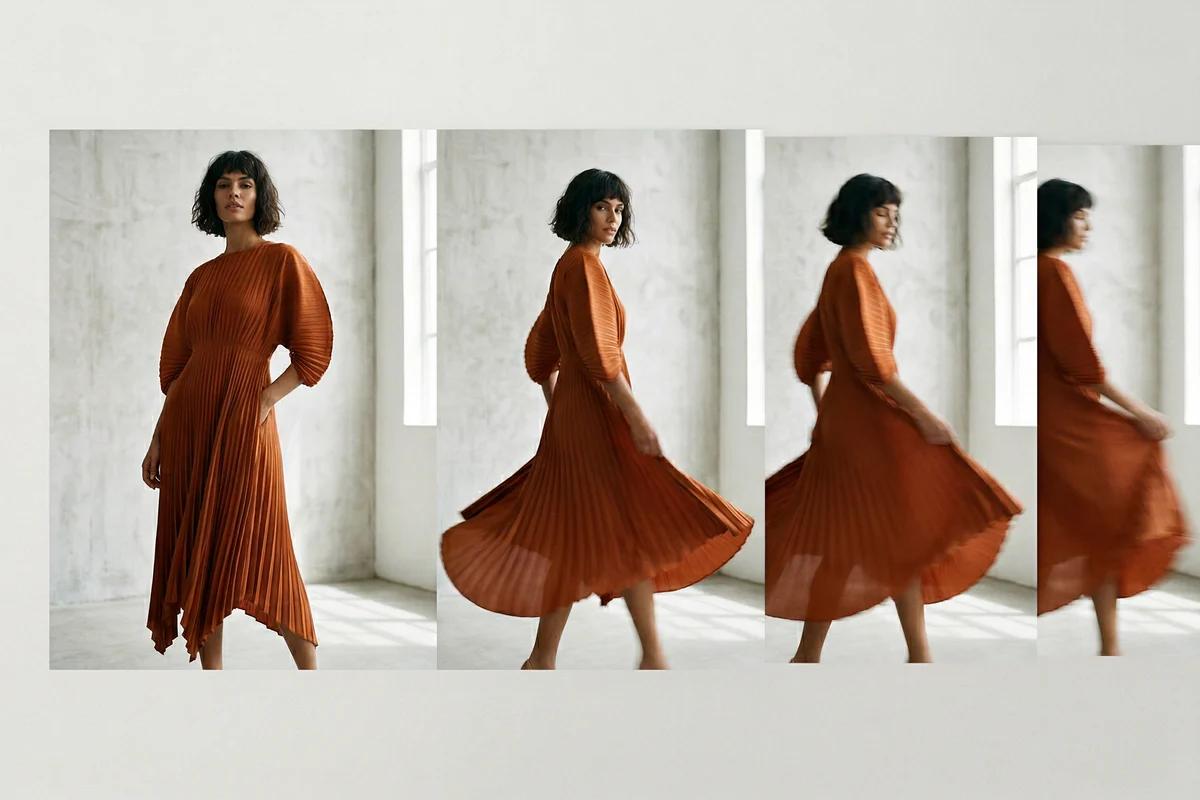
Video generation is useful when motion adds real information. Fabrics that move, dresses with volume, outerwear with shape, and campaign content for social are all good candidates. The app lets you create a video from a generated image and choose a motion style. There is also an optional AI generated soundtrack, which costs additional credits.
Do not make video simply because the option exists. Use it when movement helps the customer understand the product or helps the creative land in a channel where stills are not enough.
Pick motion style based on the garment and channel
The best motion style is rarely the flashiest one. A product that needs to show drape may benefit from subtle movement. A launch asset for paid social may tolerate more energy. A premium basics brand usually benefits from restraint. A trend driven label may want more pace.
The guiding question is simple: does the motion help the product or distract from it. If it distracts, the video may perform as visual noise without helping the sale.
Decide when soundtrack adds value
The soundtrack option can add atmosphere, but it should be used with intent. If the video is destined for a channel where sound is often off, the real value may be limited. If the asset will be used in a context where music matters, such as certain ad placements or social edits, then the extra cost may be worth it. This is another case where the destination should guide the decision, not novelty.
Create a clean review loop for teams
If several people touch the same assets, agree on a review order. One simple structure works well:
- Creative reviews garment fidelity and overall brand feel.
- Ecommerce reviews product clarity and fit readability.
- Growth reviews channel suitability and whether the asset can support campaign use.
- Final exports happen only after those questions are answered.
This is enough structure to avoid confusion without turning the workflow into bureaucracy. Teams doing multi-channel rollouts should also keep how to turn one fashion photo into PDP, email, and social assets close at hand so export decisions stay tied to the destination.
Build an asset ladder
The teams that get the most out of UNSTILL create an asset ladder. A test image becomes a selected still. A selected still may become a high quality export. A proven still may become a video. A successful combination may become a reusable template for similar products. This ladder prevents overinvestment in weak ideas and concentrates effort on the assets already showing promise.
That is how the app shifts from experimentation to production.
What good output management looks like
At the end of a project, you should be able to answer five questions clearly. Which still image is the primary keeper. Which variants are useful for alternate channels. Which outputs need no further work. Which ones are worth rerunning. Which setup choices should be repeated on the next product batch.
If those answers are available, the project was managed well. If not, you may have generated images without actually creating reusable value.
Final takeaway
UNSTILL is not finished when the render completes. It is finished when the right file is exported in the right format, at the right quality, for the right destination, with a clear understanding of what should be repeated next time. Review and export are where the tool turns generated output into actual merchandising and marketing assets. Treat that stage seriously, and the whole workflow becomes much more valuable.
If you are ready to operationalize that stage, run the next project in Unstill with the final export destination decided before you generate, not after.